As some of you may have noticed, I’ve been wearing a new friend on my arm for the past couple weeks

The Polar M400! Polar sent it to me for review a few weeks ago and I’ve been happily wearing it ever since. I’m a long time Polar user. I started of with the Polar FT4 about 6 years ago, and then more recently upgraded to the Polar RCX3 when the FT4 finally bit the biscuit.
The upgrade from the FT4 to the RCX3 was pretty epic, because it took me from a straight up heart rate monitor, to a heart rate monitor with GPS tracking capabilities. I absolutely love being able to track both my speed and heart rate with one tool, and any of you who follow my race re-caps have probably seen my read-outs this past year from the RCX3.
But let’s get back to the snazzy M400…

The training computer itself comes in the box alongs with a chest strap. a Bluetooth smart heart rate sensor (though you can also purchase just the watch computer unit on it’s own) and a USB cable. Setting it up really easy, in fact they have a couple “getting started” videos right on the website to get you up and running in no time at all. You do have to charge the M400 via the USB cable when you first receive it, and from there as needed.
In the two weeks I’ve been wearing it I haven’t had to re-charge it at all, however I have only used the GPS and heart rate functions a couple times, and I expect those draw more power so I would expect to have to recharge it more often when using those options. Personally I like that you charge it versus it going on battery power. That means there is one less watch battery I would have to deal with in the future!
[Tweet “A review of the @PolarGlobal #M400”]
One thing that really sets the M400 apart from other similar products is that it doubles as an activity tracker! So even when you’re not using the heart rate monitor or built in GPS to track your workouts your activity is still being recorded which I thought was really cool. I wear a FitBit so was eager to see how they compared when it came to daily activity tracking.
I wore the heart rate sensor to teach Zumba the first night I had it. I normally don’t like wearing heart rate monitors while teaching because I find that I get too concerned with it but I found both the chest strap and the training computer comfortable to wear and almost forgot it was even on. It has to be said that the chest straps are soo much more comfortable now that they were back when I got my FT4. No wonder it made me cranky to wear when I taught.
As a self proclaimed nerd, getting stats like this about my workouts makes me giddy. Here is the computer read-out for that Zumba class:
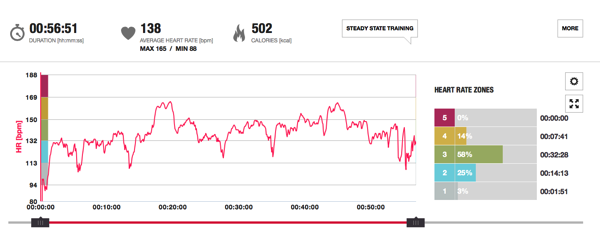
500 calories in just under an hour seems pretty good to me!
Then that weekend I wore the M400 during the Lucky 7 Relay. I had planned to wear the heart rate sensor as well but because it was so cold, I would have had to taken off about 5 layers of clothes to get to my bare skin, and at the time that didn’t sound very appealing to me! I did however, use the GPS and thank goodness I did. The really consisted of us running laps around Citadel Hill and if it wasn’t for the M400 I would have ran one more lap than I needed to. Thank goodness for GPS! Here I am stopping to talk with my teammates while we figure out if I am on my last lap or if I have one more to go!

The real issue was the race was in km, and I typically deal in miles when I run so we had to do some quick math conversions to figure it out. I was a hot mess that day which you can clearly see from the run stats. I walked a good part of the race, but I was in the middle of a fibromyalgia flair-up so I was happy just to finish!

And I have to say, it is such a nice luxury not to have to carry around a separate GPS sensor (which I have to do when using my RCX3). That’s one last thing I have to worry about being charged and losing! Another point for the M400!
Now let’s talk a bit about the 24/7 activity tracker. As I mentioned, I wear a FitBit so I was interested to see how they would compare. I will start off by saying that I wear my FitBit on my right hand, and the M400 on my left. I’m left handed and they encourage you to wear it on your non-dominant hand but I always wear my watch on my left arm, and I didn’t like the idea of wearing both the M400 and my FitBit on the same arm. Because of that I expected the M400 to record a slightly higher step count because it is on my dominant hand and might record a few more “false” steps. On the other hand, there have been times when training that I would run 10+ kilometres and my FitBit would think I’d only travelled about 7 so I knew it was sometimes a little bit crazy too.
With all that said, I personally think the Polar is slightly more accurate than my FitBit. I think that my step counts on the M400 are probably a bit higher than they should be because it’s on my left wrist, but I get the feeling that it’s giving me a better reading. Maybe that’s psychosomatic and I think that because I like the higher number and because I know my FitBit has been quite wrong different times when I ran, who knows. Certainly I have no science to back up that theory. None the less, here is a readout of my activity level on my Fitbit from last Thursday, as well as the read out from the M400:

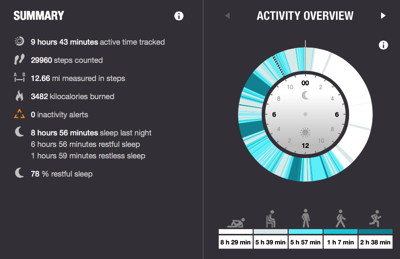
You can see that my FitBit registered me with 8 hours and 44 minutes of sleep, while the M400 said 8 hours and 56 minutes. A difference of 12 minutes which is pretty good I think. My FitBit estimated a calorie burn of 2927 versus the M400’s 3482 (I teach 5 exercise classes on Thursdays), and my FitBit counted my steps at 21,306 versus the M400’s 29960.
Obviously the biggest discrepancies are in the steps counted (part of which is due to the two counters being on opposite wrists) and total calories burned, but as I only ever look at these metrics for fun and don’t take them as 100% truth so the difference doesn’t concern me.
Something I really like in the M400 over FitBit is that it tracks you when you are laying, sitting, standing, walking and moving and shows you the breakdown of each.
 This wasn’t a particularly active day for me as you can see, and those black and grey shaded areas are the time I wasn’t wearing the training computer at all. This is actually from Halloween night, and that time from around 5:30-6:45 was when I was working on my pumpkin grinner! Looks like that wasn’t a very restful night either, since I seem to have been thrashing around quite a bit! hahaha
Another feature of the M400 (one that I’m happy to report I’ve only experienced a couple times) is a built-in inactivity alert which goes off if you’ve been inactive for a certain length of time
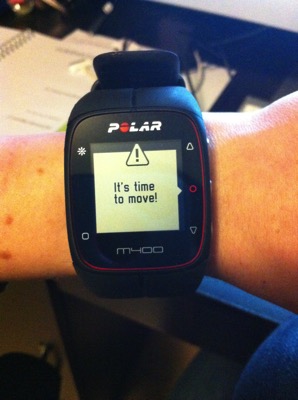
We went to see Interstellar on the weekend and it is so long that I had two alerts during the movie!
And when you sync the M400 your alerts get recorded right on your calendar so there is no hiding them 😮
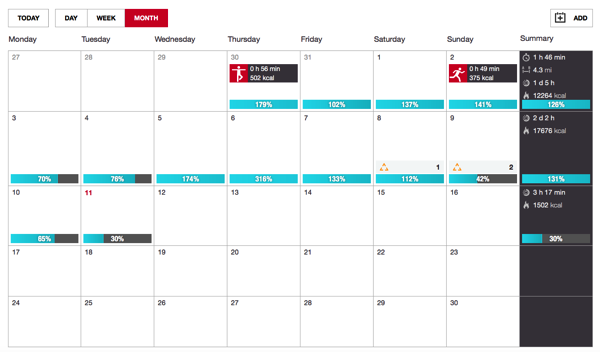
This is getting to be a pretty lengthy post, so let’s wrap it up with my pros and cons
Pros
– I love that it is an all-in-one it with GPS, activity tracking and heart rate monitoring capabilities
– The inactivity alert is great for people who are working at a desk all day and need a reminder to get up and get the blood flowing now and again
– It’s easy to use and it’s Bluetooth capabilities allow you to use it with your smartphone so you can sync and get data on the go
– The detailed activity breakdowns are really awesome, and unlike my FItBit I don’t have to tell the M400 I’m going to sleep, it just knows!
– No watch battery to worry about replacing. Just plug it in and it charges on it’s own
Cons
– I have small wrists so at first it was hard to get use to wearing it as it’s a fairly large unit. However, after about a week I was use to it and don’t mind it at all now
– My phone is an iPhone 4 (it’s like being in the stone age I tell ya!), so I don’t have Bluetooth capabilities which means I have to plug the M400 into my computer anytime I want to sync. This isn’t really a con of the product because I don’t mind doing that, I just wish my phone wasn’t so old so I could use the app because it looks super snazzy!
In case you can’t tell I’m pretty darn smitten with the M400 and I’m going to be pretty glum on Monday since my review is now over I have to send it back. Sniff, sniff. But it’s definitely going on my wish list!!
Disclosure: Polar Global sent me the Polar M400 in order to complete this review, and once completed I am sending it back to them. As always all thoughts and opinions expressed on this blog are 100% my own.
Hi,
I just brought my m400 yesterday, after reading your review.
I would just like to find out, did you download a application for your phone, or dit you always pluged it into the computer?
as the guide say use the app polar flow, but the polar flow is just for the polar loop 🙁
My iPhone is a 4 (so doesn’t have Bluetooth) so I had to plug it into my computer to sync, but if you have a Bluetooth enabled phone you can use the app! I’m linking to a review another blogger did on the M400 (As she shows screenshots of the app, that’s how I know for sure you can sync it via your phone) http://fitnesscheerleader.com/motivation/polar-m400-gps-watch-with-activity-tracking-review/
I hope you love it as much as I do!!